| docs/screenshots | ||
| scripts | ||
| src | ||
| src-tauri | ||
| .gitignore | ||
| index.html | ||
| package.json | ||
| README.md | ||
| svelte.config.js | ||
| tsconfig.json | ||
| tsconfig.node.json | ||
| vite.config.ts | ||

Claude Usage Widget
A small always-on-top Windows desktop widget that shows your live Claude
subscription usage — the same percentages Claude Code's /usage command
displays, refreshed every 5 minutes.
Themes
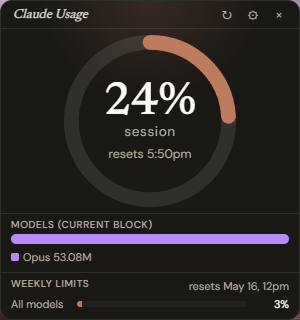
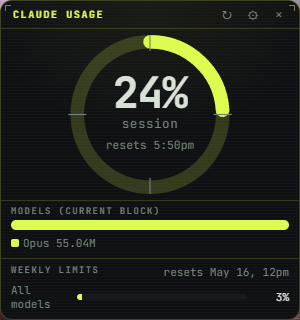
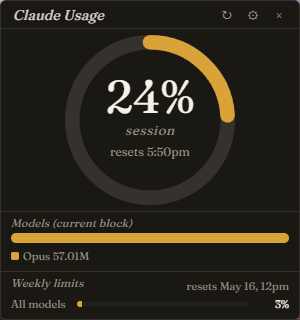
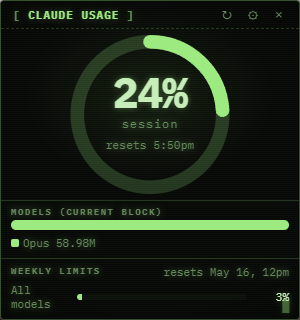
Pick one in Settings; it applies live. Each is its own typographic + chromatic system.
| Anthropic — warm cream-on-charcoal, Newsreader serif + DM Sans, sunset-orange ring, soft radial halo. The default. | Instrument — modular-synth panel, JetBrains Mono, chartreuse on slate, tick marks at 12/3/6/9, faint scanlines, bracket corners on the title bar. |
 |
 |
| Editorial — magazine artifact, Fraunces variable serif (optical-size axis), saffron on warm charcoal, italic labels, hairline rules. | Retro CRT — 1980s home computer, IBM Plex Mono, phosphor green on near-black, scanlines + vignette, bracketed [ Claude Usage ] header, blink cursor in the corner. |
 |
 |
Install
- Download the latest
Claude.Usage.Widget_<version>_x64-setup.exefrom the Forgejo releases page. - Run the installer. Windows SmartScreen will warn "unrecognized publisher" (it's not code-signed). Click More info → Run anyway.
- The widget pops up in the upper-left corner. Drag it where you want.
Requirements
- Windows 10/11 with WebView2 Runtime (preinstalled on Windows 11; downloadable on Windows 10).
- Claude Code installed and signed in.
- Native Windows install (
claude.exeon PATH) → works automatically. - Or installed inside WSL → also works automatically; the widget probes each
distro to find one with
claude.
- Native Windows install (
Using it
- The big ring shows your current 5-hour session percentage with a reset countdown.
- The bars below show the rolling weekly limits (all models + Sonnet only).
- Per-model breakdown (Opus / Sonnet / Haiku) shows how much of your local
current 5-hour block came from each — derived from your local Claude Code
transcripts. (Anthropic's
/usagedoesn't break this out, so we compute it ourselves.) - ↻ button (title bar) — force-refresh
/usageright now. - ⚙ — Settings (custom claude command, refresh interval, autostart, distro override).
- × — quit.
- The window is resizable — drag any edge.
- System tray — there's a tray icon next to the Windows clock while the widget is running. Left-click to bring the window back if you lose it off-screen; right-click for Show / Hide / Refresh / Quit.
Troubleshooting
"Claude Code not found" — the widget couldn't find a claude to run. Make sure
claude --version works in either PowerShell or a WSL shell. If it works in
a non-default WSL distro, open Settings and set claude command to e.g.
wsl.exe -d Debian bash -lc claude.
Ring shows "no /usage data" — the spawn worked but Anthropic's output didn't match the parser. Open Settings → Test /usage now → expand the raw output disclosure and file an issue with what's there.
SmartScreen blocks the installer — expected; the binary isn't code-signed. "More info → Run anyway".
Autostart toggle doesn't survive reboot — that's the dev build limitation. The released installer registers a stable path so autostart works correctly there.
Privacy
Everything stays on your machine. The widget:
- Reads your local Claude Code config (
~/.claude/projects/) for the per-model breakdown. - Spawns
claude /usageto read live percentages — that command Anthropic serves from their backend over your existing Claude Code session, exactly the same as when you type/usageinteractively. The widget never sees your OAuth token. - Stores its own settings at
%APPDATA%\claude-widget\config.json. - Makes no other network calls.
Building from source
You need a Windows host with:
winget install Rustlang.Rustup OpenJS.NodeJS.LTS Microsoft.VisualStudio.2022.BuildTools
rustup default stable-x86_64-pc-windows-msvc
corepack enable
corepack prepare pnpm@latest --activate
Then in this repo:
pnpm install
pnpm tauri dev    # iterate
pnpm tauri build  # produces NSIS installer in src-tauri\target\release\bundle\nsis\
Filing issues / pull requests on the Forgejo repo is welcome.